Email marketing
Email marketing software that keeps you out of the spam folder
Create, test, schedule and measure campaigns from your own authenticated domain — with list verification, follow-ups and automation in the same place. Pay per email, not per month.
Everything you need to run email campaigns
Lists and segments
Send to lists and segments, exclude others, and target by engagement — who opened, clicked or received a past campaign.
Three ways to write
A block-based visual builder, an HTML editor with live preview, or plain text. Start from a template or your own design.
Personalisation and AI
Merge tags like {{first_name|there}} and your custom fields. The AI campaign builder drafts copy, subject lines and follow-ups you edit before sending.
Schedule and follow up
Send now or schedule for later. Follow up with people who did not open or click, in a couple of clicks.
Test before you send
Send test emails to up to five addresses and preview exactly what recipients will see, with merge tags filled in.
Clear reporting
Opens, clicks, bounces, unsubscribes and complaints per campaign, plus a breakdown by mailbox provider such as Gmail and Outlook.
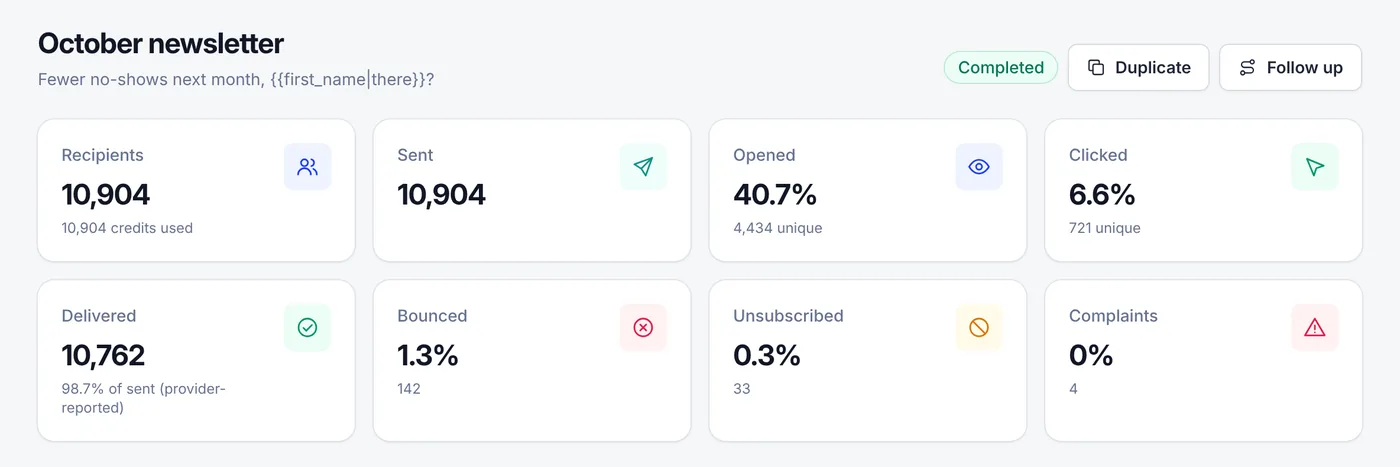
Know exactly how every campaign did
Delivered, opened, clicked, bounced, unsubscribed and complaints — on one screen, with a one-click follow-up to people who did not open. Real campaign report, example account.
From list to inbox in five steps
- 1
Import contacts
Upload a CSV or Excel file, or add contacts from your website or CRM through the API.
- 2
Verify the list
Remove invalid and risky addresses — your first 1,000 checks are free.
- 3
Authenticate your domain
Publish SPF, DKIM and DMARC records we generate for you.
- 4
Design and test
Build the email, personalise it and send yourself a test.
- 5
Send and measure
Send now or schedule, then follow up with non-openers.
Why deliverability is built in
Most email marketing tools leave deliverability to you. The result is campaigns that look fine in the editor but quietly land in spam because of an old list or a missing DNS record.
InboxRoads puts the checks in the sending path:
- Verified lists. Email verification is one click away, so you can remove bad addresses before they bounce.
- Authenticated domains only. Campaigns can only be sent from a domain you have verified with SPF, DKIM and DMARC.
- Automatic suppression. Unsubscribes, hard bounces and spam complaints are never mailed again.
- Monitoring. The Deliverability Center watches your domain's records and block-list status and shows a score built from real sending data.
No tool can promise every email reaches the inbox — that also depends on your content and your audience. But sending only to real, consenting people from a properly authenticated domain is the foundation every inbox provider looks for.
Compliance in every campaign
Need more than one-off campaigns? Automation workflows send welcome series, lead nurturing and re-engagement emails on their own.
Email marketing FAQ
Yes. You can import contacts, build lists and segments, design emails with a visual or HTML editor, send or schedule campaigns from your own domain, send follow-ups and automated sequences, and measure opens, clicks, bounces and unsubscribes. Email verification and deliverability monitoring are built in.
With prepaid credits: one credit per email sent, with no monthly fee required. Credits you buy never expire, so you pay only in months you send. Monthly plans with included credits are also available on the pricing page.
Yes, and it is required. You add your domain, publish the SPF, DKIM and DMARC records we generate, and only verified domains can be used as From addresses. That is what Gmail and Yahoo expect from bulk senders.
Yes. Export your audience as CSV (or Excel) and import it. Columns such as first name and company are mapped to fields, and you can verify the list before your first campaign so old addresses do not hurt your reputation.
Yes. From a sent campaign you can create a follow-up to recipients who did not open or did not click. For multi-step sequences — welcome series, lead nurturing, re-engagement — use automation workflows.
No. Send only to people who agreed to hear from you. Every campaign includes an unsubscribe link and one-click unsubscribe, and bounces and complaints are suppressed automatically.
Guides
Send your first campaign this week
Create a free account, verify your list and authenticate your domain. Buy credits only when you are ready to send.