Email verification
Email verification service: clean your list before you send
Find invalid, disposable, role-based and risky addresses in any list. Upload a CSV or Excel file, check one address, or verify through the API — and only pay for the addresses that need checking.
- olivia@brightsmile.co Valid
- info@riverside-dental.com Role-based
- liam.patel@gmial.com Invalid domain
- emma@uptownortho.com Valid
- noah@mailinator.com Disposable
- ava.kim@dentalcare.io Valid
How bulk email verification works
Upload
A CSV or Excel (.xlsx) file, pasted addresses or an existing contact list.
Review cost
Duplicates and malformed addresses are removed first, free. You see exactly how many credits the job needs.
Verify
Checks run in the background. Close the page if you like — we email you when the list is done.
Use results
Download valid, invalid and risky files, or save the valid addresses into a list and send.
Your results, at a glance
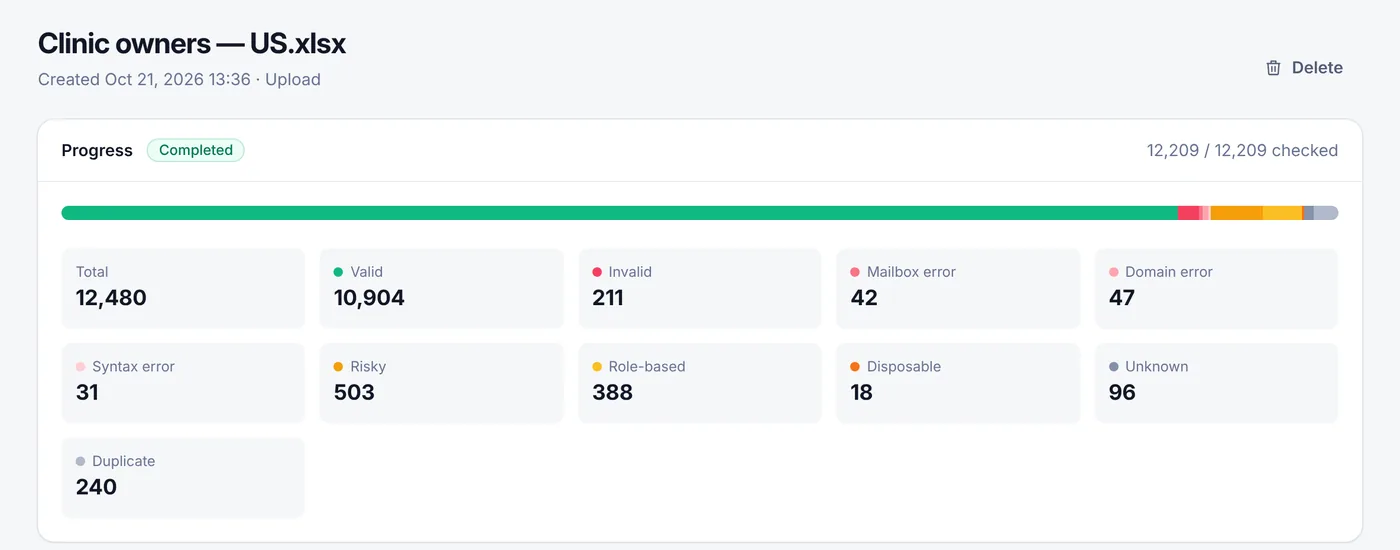
Every job shows exactly how many addresses were valid, invalid, risky or duplicated — and what it cost. This is the real results screen, with an example list.
What every address is checked for
Each check removes a different kind of address that would bounce, never be read, or get your mail filtered as spam.
Syntax and format
Catches typing mistakes such as missing @ signs, spaces, double dots and invalid characters — before they cost you a bounce.
Domain and mail servers
Confirms the domain exists and has mail servers (MX records) that accept email. Dead and misspelled domains are flagged as invalid.
Mailbox existence
Asks the receiving server whether the mailbox exists, through the verification providers your platform connects. Closed mailboxes are marked invalid.
Catch-all domains
Some servers accept every address, so a mailbox cannot be confirmed. These are marked risky so you decide how to treat them.
Disposable inboxes
Temporary addresses from throw-away services are flagged. They are rarely read and often used to grab a sign-up offer.
Role-based addresses
Shared inboxes such as info@, sales@ or support@ are labelled. They are read by several people and complain more often.
Three ways to verify
Bulk list verification
Upload a CSV or Excel file with thousands of addresses. Columns are detected automatically, duplicates are removed for free and the job keeps running if you close your browser.
How to verify a listSingle email check
Check one address from your dashboard before adding it to a list or replying to a lead. Try the free email verifier without an account.
Open the free verifierEmail verification API
Verify addresses in real time from sign-up forms, CRMs and your own code with a REST call and a scoped API key, or from n8n, Zapier and Make.
API documentationUnderstanding your results
| Result | What it means | Recommended action |
|---|---|---|
| Valid | The domain accepts mail and nothing suggests the address is unsafe. | Send |
| Invalid | The provider confirmed the address cannot receive mail. | Remove |
| Mailbox error | The mailbox does not exist or cannot accept mail. | Remove |
| Domain error | The domain has no mail servers or does not exist. | Remove |
| Syntax error | The address is not correctly formatted. Not charged. | Remove |
| Disposable | A temporary inbox service. | Remove |
| Role based | A shared address such as info@ or sales@. | Send with care |
| Risky | Catch-all domains or signals of low quality. | Send with care |
| Unknown | The receiving server did not give a clear answer. | Re-verify later |
| Duplicate | Appeared more than once in your input. Not charged. | — |
Built-in checks cover syntax, domain and mail-server (MX) records, disposable domains and role addresses. Mailbox-level checks run through the external verification providers connected to the platform. No verification method can predict every bounce; results reflect the state at the time of checking.
Why verify email addresses before sending?
Every email list decays. People change jobs, abandon old inboxes and mistype their address on sign-up forms. When you send to those addresses, the messages bounce — and mailbox providers such as Gmail, Outlook and Yahoo treat a high bounce rate as a sign of a careless or spammy sender.
The result is not just wasted sends. A poor sender reputation pushes your good emails into the spam folder too, and some old addresses are turned into spam traps that can get your domain or IP blacklisted.
Verifying a list before a campaign removes those addresses up front. You keep your bounce rate low, protect the reputation of your domain, and stop paying to send to inboxes nobody reads.
When to verify
- Before the first campaign to any imported or older list;
- Every few months for lists you send to regularly;
- In real time on sign-up and lead forms, through the API;
- Before moving a list to a new sending platform or domain.
Simple, pay-as-you-go pricing
- 1,000 free verifications when you create an account.
- 1 credit = one address verified. The same credits also send email.
- Duplicates and badly formatted addresses are free — removed before checking.
- Purchased credits never expire. No monthly subscription required.
- From $0.60 per 1,000 verifications with the largest credit pack.
Email verification FAQ
Email verification checks whether an address can actually receive email before you send to it. It catches typos, addresses at domains that do not exist, mailboxes that were closed, temporary (disposable) inboxes and other addresses that would bounce or hurt your sender reputation.
Format, domain and mail-server checks are definitive. Mailbox-level checks depend on how the receiving server answers: most give a clear yes or no, but some accept every address (catch-all) or answer unclearly. Those are marked "risky" or "unknown" instead of being guessed. No service can predict every future bounce.
Your first 1,000 verifications are free when you sign up. After that you pay with prepaid credits: 1 credit per address verified. Duplicates and badly formatted addresses are removed before checking and are never charged. Purchased credits do not expire and there is no monthly subscription.
CSV and Excel (.xlsx) files, or addresses pasted into a box. You can also verify a contact list you already have in InboxRoads, check a single address, or call the verification API from your own software.
You download separate files for valid, invalid and risky addresses (and the full results), or save the valid addresses straight into a contact list. Your files are stored privately in your account and you can delete them at any time.
Send to them with care. Catch-all domains accept every address, so a mailbox may still not exist. A good approach is to send to them in smaller batches, watch the bounce rate and remove addresses that bounce.
Verify every new list before its first campaign, and re-verify older lists every few months — a typical list loses a noticeable share of valid addresses each year as people change jobs and close mailboxes.
Guides and free tools
Clean your list before the next campaign
Create a free account and verify your first 1,000 addresses at no cost. No card required.